A practical technical interview guide for software developers
JM Innovatech Solutions
Introduction
Technical interviews for software developer positions are not limited to programming syntax. Interviewers often want to know whether a developer can work safely with other developers, manage source code, understand Git and GitHub, troubleshoot problems, and make sound decisions when working on a production project.
One particularly useful interview topic is the Git merge conflict. A candidate may be given a scenario involving two developers who have modified the same file and are asked what they would do as the senior developer responsible for reviewing and merging the work.
This guide presents six practical interview questions and strong model answers. The examples are designed to demonstrate not only knowledge of Git commands, but also the reasoning and professional judgment expected from a software developer.
Interview tip
Do not answer Git questions by listing commands alone. Explain what you would check, why you would do it, how you would protect the codebase, and how you would verify that the final result works.
Interview Question 1: Resolving a Merge Conflict
Question
Two developers are working on the same project. Both developers push changes to the same file on GitHub. You are the senior developer and need to review and merge their branches. You notice that there is a merge conflict. What would you do to resolve the conflict?
Model Answer
First, I would not resolve the conflict blindly. I would identify the conflicting files and understand what each developer changed. I would review the pull requests, commit history, and the purpose of the changes so I can determine what the correct final implementation should be.
I would typically follow these steps:
Update my local repository so that I am working with the latest versions of the relevant branches.
Check the repository status and identify the files with conflicts.
Open each conflicting file and examine the conflict markers.
Compare both developers' changes and determine whether one change should be kept or whether both changes should be combined.
Resolve the conflict manually and remove the Git conflict markers.
Run automated tests and manually test the affected functionality.
Review the final diff to make sure no legitimate changes were accidentally removed.
Commit the conflict resolution and push the updated branch.
Only merge the pull request after the code has passed the required checks and review.
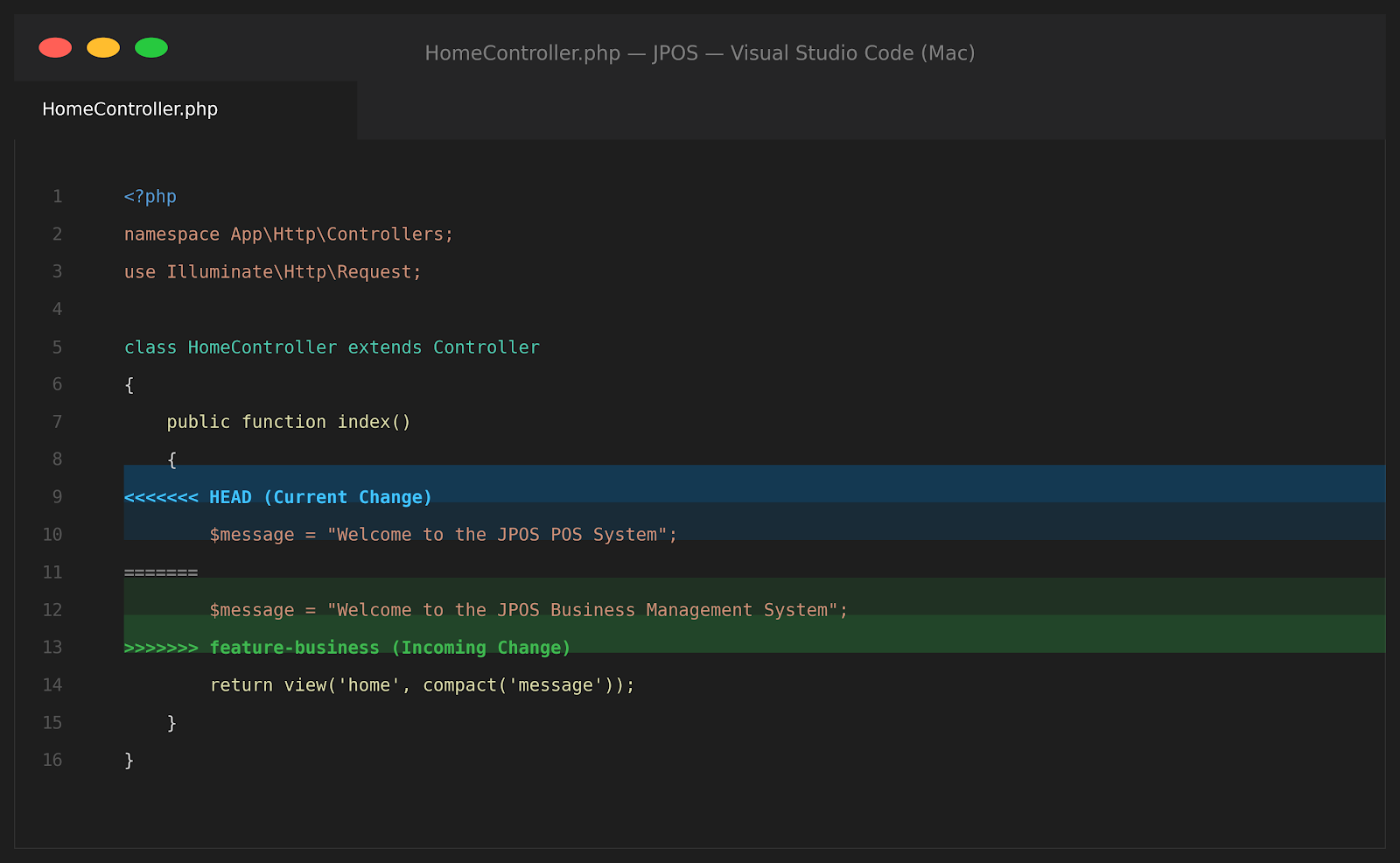
For example, Git may show:
<<<<<<< HEAD
$message = "Welcome to the JPOS POS System";
=======
$message = "Welcome to the JPOS Business Management System";
>>>>>>> feature-business
I would determine the intended business requirement before choosing a version. If both changes are important, I would combine them into a correct implementation rather than simply accepting one side.
Strong Closing Statement for the Interview
My priority would be to preserve the intended functionality of both changes, resolve the conflict deliberately, test the resulting code, and only then merge it into the target branch.
Interview Question 2: What Is a Merge Conflict and Why Does It Happen?
Question
What is a merge conflict in Git, and under what circumstances does it normally occur?
Model Answer
A merge conflict occurs when Git cannot automatically combine changes from two branches because the changes overlap in a way that Git cannot safely decide between. This commonly happens when two developers modify the same line or section of a file.
It can also occur when one branch modifies a file while another deletes or significantly changes it. Git stops the merge so that a developer can make an informed decision instead of allowing Git to guess and potentially introduce a bug.
Interview Question 3: What Would You Do Before Merging a Pull Request?
Question
You are reviewing a developer's pull request. There is no merge conflict. What checks would you perform before merging it?
Model Answer
I would first understand the purpose of the change and review the code against the requirements. I would inspect the diff rather than only looking at the final files. I would check for unnecessary changes, security issues, duplicated logic, poor error handling, and possible performance problems.
I would also verify:
Automated tests are passing.
The code follows the project's coding standards.
Database migrations and configuration changes are safe.
The change does not break existing functionality.
Sensitive information such as passwords, API keys, and credentials has not been committed.
The pull request has appropriate review and documentation.
The branch is up to date enough with the target branch to avoid introducing integration problems.
Interview Question 4: What Is the Difference Between Git Pull and Git Fetch?
Question
What is the difference between git fetch and git pull, and when would you use each?
Model Answer
`git fetch` downloads the latest information from the remote repository without automatically merging those changes into the current branch. It is useful when I want to inspect remote changes before deciding how to integrate them.
git fetch origin
`git pull` normally fetches the remote changes and then integrates them into the current branch. Depending on the repository configuration, that integration may happen through a merge or rebase.
git pull origin main
As a senior developer, I may prefer fetching first when I want more control over the integration process, especially before a sensitive merge.
Interview Question 5: How Would You Handle a Developer Who Accidentally Pushes Broken Code?
Question
A developer pushes code to a shared branch and the application starts failing. As the senior developer, what would you do?
Model Answer
First, I would assess the impact and identify the exact commit or change that introduced the problem. If the issue affects production, my priority would be restoring service safely, either by reverting the problematic change or applying another appropriate recovery strategy.
I would avoid blaming the developer. After stabilizing the system, I would investigate the root cause, correct the code, add or improve tests, and review the development process to prevent the same issue from happening again.
For a normal shared branch, a safe approach may be to create a revert commit rather than rewriting shared history.
git revert <commit-hash>
The exact response depends on whether the code is in production, staging, or a development branch, and whether other developers have already based work on the commit.
Interview Question 6: What Is the Difference Between git merge and git rebase?
Question
Explain the difference between Git merge and Git rebase. When would you use each?
Model Answer
A merge combines two lines of development and preserves the branch history. If the branches have diverged, Git may create a merge commit.
git merge main
A rebase moves my branch's commits so they appear on top of another branch. It creates a more linear history, but it rewrites commit history.
git rebase main
I would be careful when rebasing branches that have already been shared with other developers because rewriting shared history can create problems. For private feature branches, rebase can be useful for keeping the history clean. For shared branches, I would follow the team's established Git workflow.
Bonus Interview Question: What Would You Do If You Accidentally Started the Wrong Merge?
Question
You started a merge and immediately realize that you merged the wrong branch. What can you do?
Model Answer
If the merge is still in progress and has not been completed, I can usually cancel the operation with:
git merge --abort
After aborting, I would confirm the repository status, verify that my working tree is in the expected state, and then perform the correct operation.
How to Answer Git Questions Like a Senior Developer
A strong candidate does more than remember Git commands. Senior-level answers show decision-making, risk awareness, collaboration, testing discipline, and an understanding of the application's business requirements.
Explain your reasoning: Tell the interviewer why you would take a particular step instead of only naming the command.
Protect the codebase: Mention testing, code review, backups where appropriate, and safe deployment practices.
Understand the business requirement: The correct resolution is determined by what the application should do, not simply by which branch was changed first.
Communicate with developers: When two changes conflict, discuss the intended behavior with the developers when necessary.
Verify before merging: A conflict can be syntactically resolved while still producing incorrect application behavior.
Practical Git Commands to Remember
Check the current repository state
git status
Download remote changes without merging
git fetch origin
Pull and integrate remote changes
git pull origin main
View code differences
git diff
Stage resolved files
git add .
Commit a resolution
git commit -m "Resolve merge conflicts"
Cancel an active merge
git merge --abort
Revert a published commit safely
git revert <commit-hash>
Push changes
git push
A Real-World Development Perspective
In a professional software environment such as JM Innovatech Solutions, Git conflicts are part of normal collaborative development. Developers may work on different modules while sharing common controllers, models, views, services, database migrations, or frontend components.
For example, John Muthoga, a developer at JM Innovatech Solutions, may be working on one part of the JPOS System while another developer updates a related module. If both changes affect the same code, the team must resolve the conflict based on the intended functionality of the system rather than simply choosing one developer's version.
This is why Git knowledge is more than knowing commands. It is about understanding code, collaborating with a team, assessing risk, and making decisions that keep the software stable.
Key lesson
In an interview, demonstrate that you can resolve the conflict technically and that you understand the responsibility that comes with merging someone else's code.
Final Takeaway
Git and GitHub interview questions are often designed to test practical engineering judgment. A strong answer should show that you can work collaboratively, protect the codebase, investigate problems, communicate clearly, and verify your work before it reaches production.
If you are asked about a merge conflict, remember the core process: identify the conflict, understand both changes, determine the correct final behavior, resolve the code, test it, review the result, commit the resolution, and merge only when you are confident that the application remains correct.
That approach demonstrates the mindset expected from a professional software developer and especially from someone taking responsibility for a team's code as a senior developer.
JM Innovatech Solutions